Sleep, Activity and Heart Rate: Your Health Data
Sam has been low for a few weeks. At his session, his therapist asks how he has been sleeping, and what a normal day looks like. Sam says "badly" and "not much", and then realizes he cannot say how many nights were bad or how many days he left the flat. His phone knows, though. It counted his steps and recorded when he was in bed, and it has been doing so all along.
CopingCard can read daily summaries of this kind from your phone's health app, so you do not have to type them in. This article explains what it reads, what you see, who else can see it, and how to stop sharing and delete what was imported. It also explains what the numbers cannot tell you.
Why sleep and activity matter in CBT
Cognitive behavioral therapy (CBT) treats what you do, and how you sleep, as part of the picture. Sleep and activity are among the processes that keep difficulties going or help them ease. A low mood can lead to less activity, which can lead to a lower mood. Poor sleep and low mood often travel together. Looking at these patterns is part of behavioral activation, and part of CBT for sleep problems (see Getting Active and Sleep).
The trouble is that memory is shaped by mood. On a low day, the whole week looks bad. This is why therapists ask for records made close to the moment, and why a measurement that does not depend on remembering can be a useful addition. It does not replace your own account of how you felt, which only you have.
What CopingCard reads
You choose which of three types to share with CopingCard.
- Sleep. Time in bed, time asleep, awakenings and sleep stages, as one summary for each night.
- Activity. Steps, active minutes and workouts, as one summary for each day.
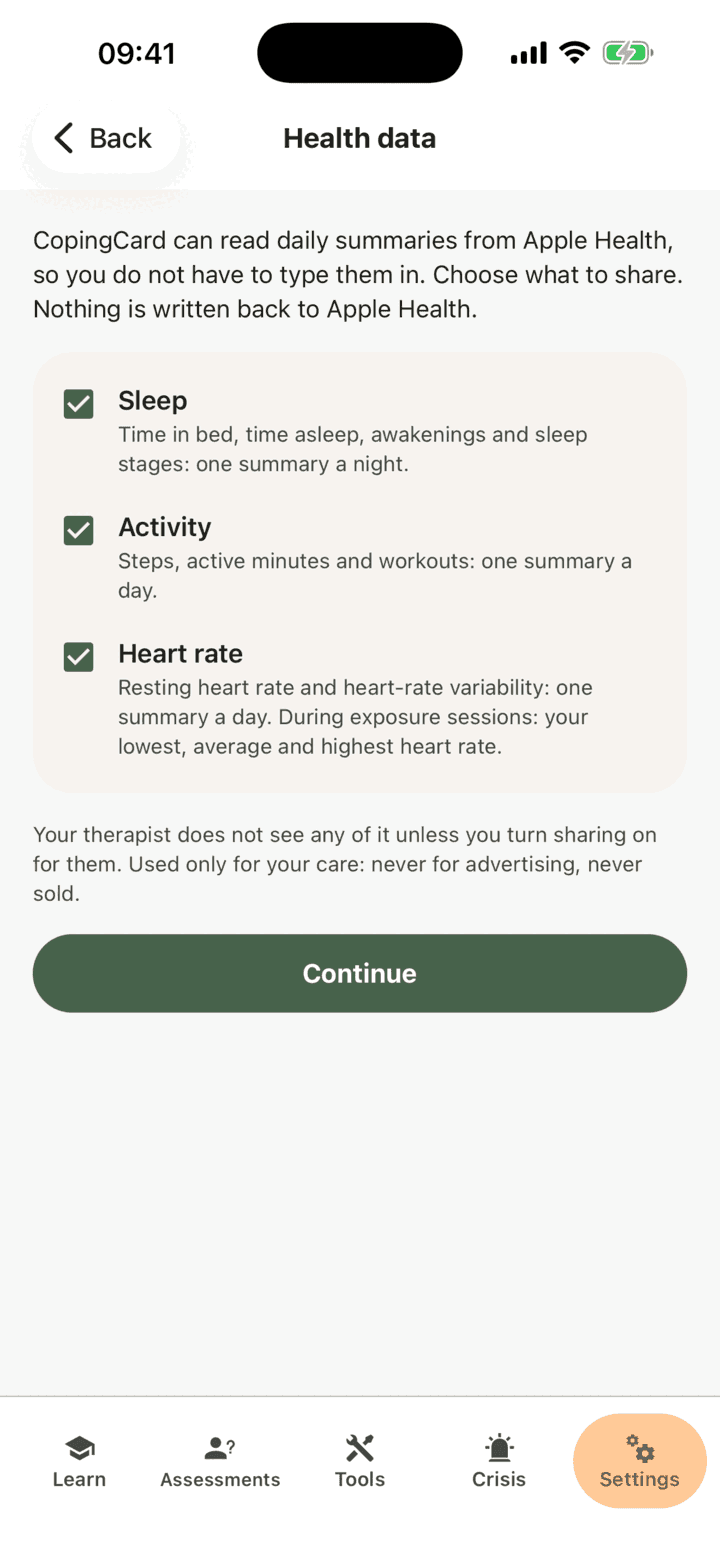
- Heart rate. Your resting heart rate and heart-rate variability (HRV), as one summary for each day. During an exposure session (see Exposure), it also records your lowest, average and highest heart rate for that run.
CopingCard reads summaries, not a continuous stream. It does not see your heart rate minute by minute. It reads when you open the app, not while the app is closed, and the first read goes back 30 days. It only reads: nothing is ever written back to your health app.
On an iPhone, the source is Apple Health. On Android, it is Health Connect, which needs Android 9 or later and is built into Android 14 and newer. Either one has data in it only if your phone, a watch or another app writes to it. If you have no watch, your phone may still count steps. Everything in CopingCard works without any of this, and you can keep your records by hand.
Connecting, step by step
- In the app, tap the Settings tab, then Health data.
- Read what each type is. The screen says that nothing is written back and that your data is used only for your care, never for advertising and never sold. All three types are ticked. Untick any you do not want to share.
- Tap Continue, and allow access in the sheet your phone shows.
You are brought back to CopingCard, which shows when sharing started for each type and, within seconds, the last night or day that came in. If nothing has arrived, that usually means the phone has no data, or access was declined in the health app.
Reading your own numbers
Under Health data there are three views: My sleep, My activity and My heart. Each shows the last 30 days.
- My sleep shows time in bed, time asleep, efficiency (the share of time in bed that you were asleep) and awakenings for each night.
- My activity shows steps, active minutes and workouts for each day.
- My heart shows your resting heart rate and HRV for each day. HRV is measured differently on the two kinds of phone: as SDNN on an iPhone and as RMSSD on Android. They are different measures, so numbers from different phones are not comparable.
These screens show numbers only. There are no scores, no labels such as "good" or "poor" sleep, no targets and no advice. CopingCard does not interpret your heart rate or predict anything from it. It is not a medical device, and a heart-rate number is not a diagnosis. The numbers are also only as good as what your phone or watch measured. They are there to help you notice patterns and to give you and your therapist something to talk about.
What Sam noticed
Sam connected sleep and activity and used his check-ins as usual. After three weeks, he opened My sleep and My activity beside his mood chart. Several of his lowest days came after nights when he was in bed for ten hours and asleep for fewer than six. On many of those days he had taken almost no steps.
That did not prove anything, and Sam did not treat it as proof. A low day can cause a bad night as easily as the other way around. But it gave him something specific to bring to his therapist, and the two of them chose a small step: a short walk after lunch, written into his plan in Behavioral Activation. When he did it, it showed up in his activity. They did not make the walk a test of his character. They watched what happened.
What the app adds to a paper diary
A paper sleep diary asks you to remember, every morning, when you went to bed and how often you woke. That is the part many people stop doing first.
- Nothing to type. The numbers come from the phone, so a bad week does not leave a blank page.
- Measured, not remembered. Your phone records the night as it happens, so you are not reconstructing it the next morning.
- Beside your mood. Your sleep and active minutes appear next to your check-ins, so you can look at them together. See Noticing Your Mood.
- Into your plan. In Behavioral Activation, your walks and workouts can be offered as activities you have already done.
- Heart rate in exposure. If you share heart rate with CopingCard, an exposure session records your lowest, average and highest heart rate for that run.
- A view for your therapist, if you choose. What you share appears on the Sleep & activity tab of your page in their portal (see below). They can also set an activity target on a task, such as a workout of a set length a given number of times a week, and if you share activity, the task marks itself done once your phone shows enough workouts.
Who sees it
Your therapist sees none of it unless you turn sharing on for them. The choice is made per therapist and per type. Under Health data, tap Therapist sharing, find your therapist, and turn on any of Sleep, Activity and Heart rate. All of them start off. A type you have not shared with CopingCard first cannot be turned on for a therapist.
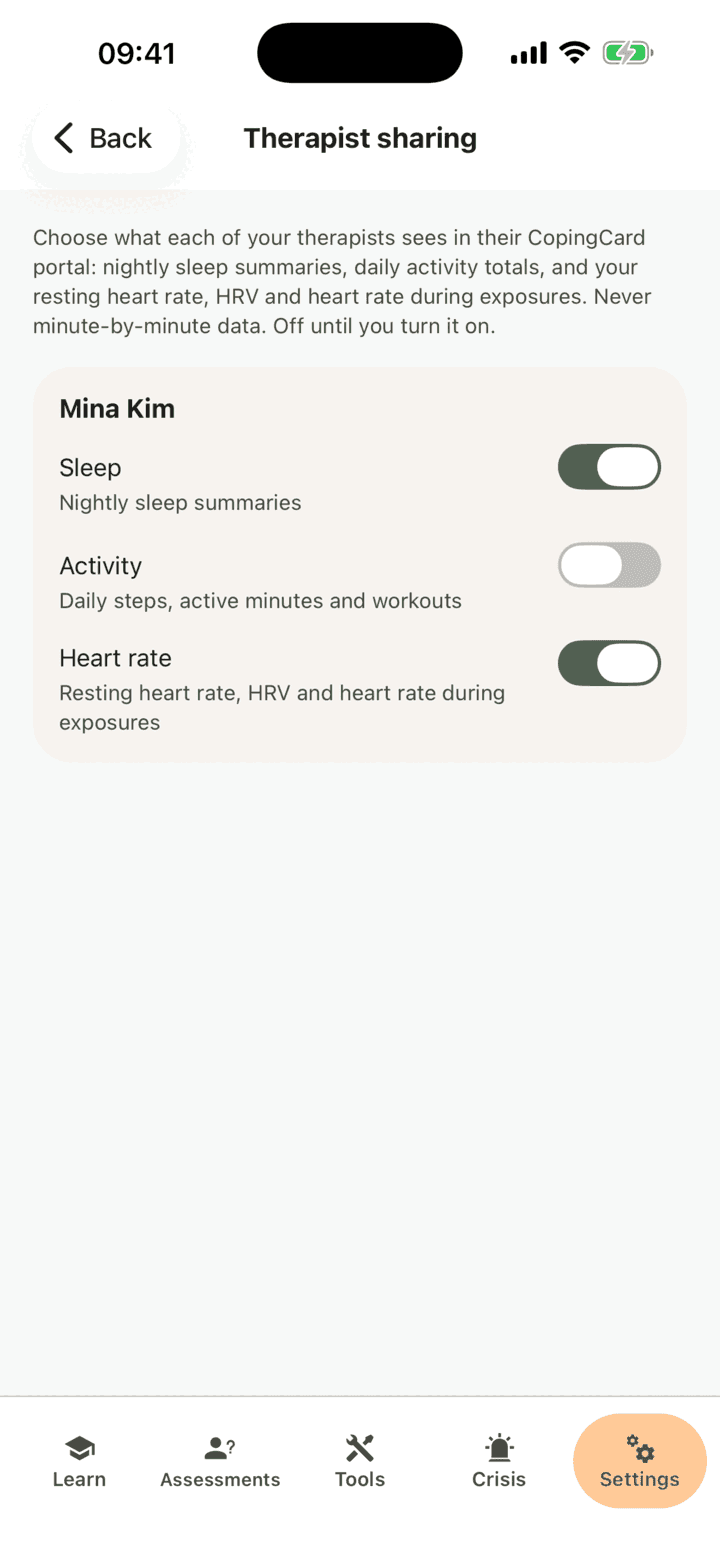
Two more conditions apply. Your therapist can see a type only if you have also switched on Allow viewing my data for them, and the admins of their practice only if you switch on Allow practice admins to view my data. Your therapist sees nightly sleep summaries, daily activity totals, and your resting heart rate, HRV and heart rate during exposures. They never see minute-by-minute data, and they are not alerted when new data arrives. A type that is not shared reads "not shared" on their screen.
Your data is used only for your care. It is never used for advertising and never sold.
Stopping and deleting
You can stop at any time.
- Under Health data, tap Stop sharing….
- Choose which types to stop.
- Tick Also delete what was imported if you want the numbers CopingCard already holds removed. If you do not tick it, the earlier numbers stay.
- Tap Stop sharing.
A therapist you shared that type with sees it as "not shared" at once. If you chose to delete, the imported numbers are deleted within about a minute. To remove CopingCard's access completely, also turn it off in your health app. The screen has a button that takes you there. Imported health data counts as your personal data, so it is removed along with the rest when your data is erased.
What the evidence says
The reasoning rests on the method. Records made close to the moment avoid much of the distortion of recall (Stone and Shiffman, 1994), and monitoring is a long-standing part of CBT. Sensor numbers add a measurement, but not meaning. Meaning comes from you and your therapist.
Checking numbers can also become its own habit. If you notice that you look at your sleep or heart rate again and again, feel anxious about it, or feel worse after each look, look less often, or turn the type off, and tell your therapist.
When to get more help
Sleep and heart-rate numbers cannot tell you whether something is wrong. If you are worried about your heart, your sleep or how you feel, talk to your doctor or your therapist. If you feel unsafe at any point, open the Crisis tab in the app, or contact your local emergency services.
In short
- CopingCard reads daily summaries of sleep, activity and heart rate from your phone, and only when you open the app. It never writes anything back.
- You see numbers only: no scores, labels, advice or alerts.
- Your therapist sees nothing unless you turn on each type for them, and never sees minute-by-minute data.
- You can stop sharing at any time and delete what was imported.
- The numbers are a starting point for noticing and talking, not a diagnosis.
For the step-by-step guide to the screens, including what your therapist sees in the portal, see the Health data page in the help centre.
Sources
- Stone, A. A., & Shiffman, S. (1994). Ecological momentary assessment (EMA) in behavioral medicine. Annals of Behavioral Medicine, 16(3), 199-202.
- Shiffman, S., Stone, A. A., & Hufford, M. R. (2008). Ecological momentary assessment. Annual Review of Clinical Psychology, 4, 1-32.
- Martell, C. R., Addis, M. E., & Jacobson, N. S. (2001). Depression in Context. W. W. Norton.